
Welcome to your On-site Industry Symposia Manual
Please find below the information you will need to plan your industry symposia at the World Congress of Nephrology.
Industry Symposia General Enquiry
Anderes Fourdy Events
Tel: +60 10 981 1491
E-mail: [email protected]
Website: https://www.theisn.org/wcn/
Contact: Ms Azwin Zamri
Audio-Visual
Anderes Fourdy Events
Tel: +60 12 302 9898
Email: [email protected]
AV Manager: Mr Ricky Yoong
Badge Scanning Services
Please direct enquiries to Anderes Fourdy Events
Please confirm on the booking form. Tick “Other” and fill in “Badge Scanning”.
Official Decoration Contractor
ES Exhibition Services Sdn Bhd
Tel: +603 9172 1598
Email: [email protected]
Contact: Ms Mandy
Official Freight Forwarder
R.E. Rogers (Malaysia) Sdn Bhd
Tel: 603- 5510 8511
Fax: 603- 5510 6293
Email: [email protected]
Contact: Mr. Rasyid
Accommodation Services
Please direct queries to Anderes Fourdy Events
View official WCN hotels here: In-Person Participation – World Congress of Nephrology (theisn.org)
Contact: Mr Hazwan Zaharudin
Forms
Please see here important forms for industry symposia organizers at WCN. Not all forms are mandatory to complete. Please read through this manual carefully to see which forms apply.
To reserve Badge Scanning Devices and Rehearsal Slot, please complete the regular booking form here.
Checklist
Failure to submit fully completed order forms by the stated deadlines may result in non-availability of services or surcharges. Companies who book a symposium slot after the deadlines stipulated are requested to submit all forms immediately.
February 10, 2022
February 10, 2022
February 10, 2022
February 10, 2022
February 8, 2022
February 11, 2022
January 31, 2022
January 31, 2022
Deadline to order Lectern and Speaker Table Branding
Deadline to order and submit Invitation Card
Deadline to order Hostess Hiring
Deadline to confirm details of representative who will pick up group tickets on-site
Deadline to organize additional AV
Deadline to finalize registrations
Deadline to book a Rehearsal Slot
Deadline to order Badge Scanning Devices
Industry symposia package
The rates charged to organize an industry symposium include:
● Rental of the room and standard set up (Theater style, stage, lectern, speaker table and chairs)
● Sound system with wired microphones
● Projector, screen and AV operator
● Publication of the symposia program online on the congress website
● Program will be displayed in industry symposia e-program book (Design provided by sponsor)
● Use of the speaker preparation room and presentation management system
● Use of congress logo on invitations and promotional documents (after approval of artwork by congress secretariat)
● Catering for symposia attendees
Installations or alterations to the rooms and the standard set-up can only be made with the explicit approval from the organizers.
Congress venue
Kuala Lumpur Convention Center
Jalan Pinang, Kuala Lumpur City Center
50088 Kuala Lumpur, Wilayah Persekutuan Kuala Lumpur
Schedule
Morning slot: 09:00am – 10:00am MYT
Lunch slot: 12:00pm – 01:00pm MYT
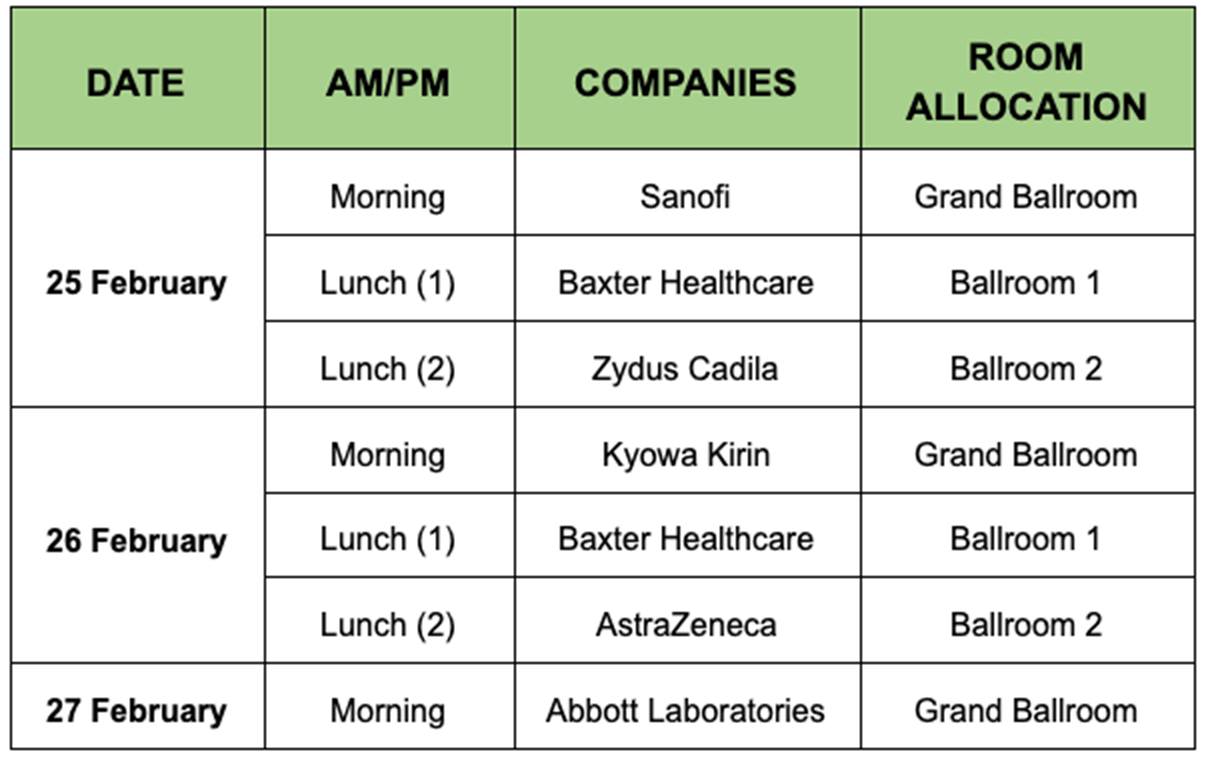
The above schedule is dated January 19, 2022. Please visit our WCN Industry Symposium page for the most recent schedule and program details.
Companies will have ONLY access to the symposium room 15 minutes before the assigned starting time for set up and/or rehearsal. Technical staff will be available for support at that time only.
Companies must strictly adhere to the indicated start and ending times of the reserved time slot. Extensions beyond the assigned timings are not allowed under any circumstances.
The symposium venue should be completely vacated immediately after the end of the symposium. Companies are responsible for removing all materials, waste, etc. from the room. Any costs for removal will be charged to the symposia organizer. It is compulsory that the organizers communicate to their attendees to use the bins located in the room.
Catering
The ISN is organizing catering for symposia attendees.
Morning symposia: Coffee & tea should be available for collection from 10:00am – 10:30am (MYT) at the entrance of the Grand Ballroom.
Lunch symposia: Lunchboxes should be available for collection from 11:30am – 12:00 pm (MYT) at the entrance of the immediate symposium room.
Audio visual
Equipment available in session room:
● 2 x handheld microphones
● Sound system
● 2 x comfort monitors on stage – Timer + Presentation for presenter view
● 1 x speaker lectern
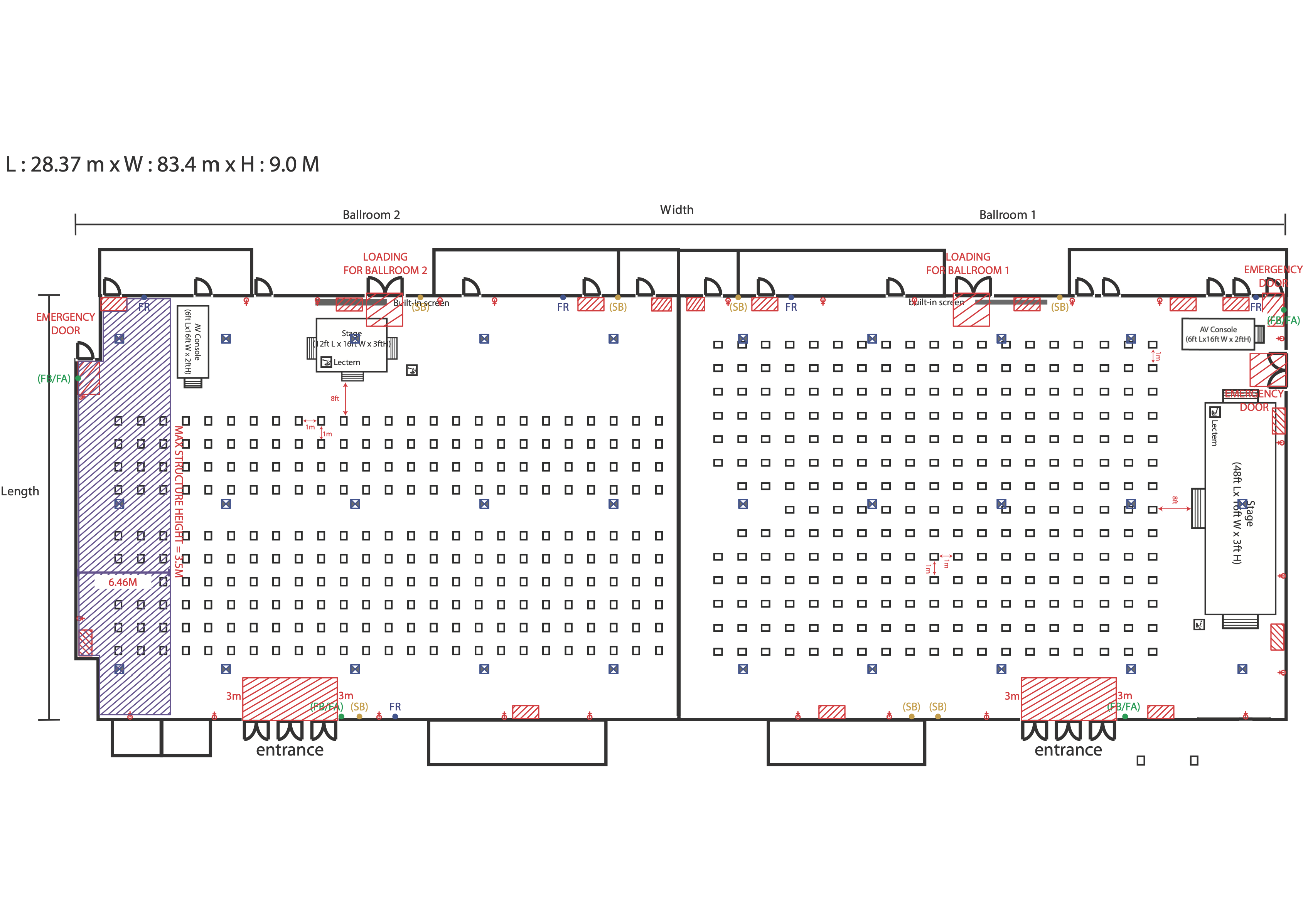
● Speaker table(s) – see floorplans for number in each room
● 1 x clicker
Symposium organizers may use the audio visual equipment that the congress uses in each room at no extra costs. Symposium organizers are however not permitted to move or take away any equipment that is used by the congress for its scientific sessions.
Symposium organizers may also make arrangements to add extra equipment and/or hire alternative equipment for their symposium after consultation with the official WCN AV consultant, Ricky Yoong (Please see Contacts section). The deadline for additional AV-orders is 8 February 2022. Orders must be completed and confirmed by this date to [email protected]
Industry symposia e-program book
All industry symposia have the opportunity to provide a brochure visual to be placed in the symposia program e-book. The e-book will be displayed on the WCN congress website for delegates. There is no extra fee for this.
Specifications: A4 size (210 x 297 mm/8.3 x 11.7 inches)
Format: PDF
Deadline to submit: January 21, 2022 by email to [email protected]
Flyer in delegate bag
Symposia organizers have the right to place a promotional card into the congress bag which is given to every delegate at KLCC. You are allowed to either send your own-produced materials to Kuala Lumpur Convention Centre on 24 February 2022 or request the local PCO for printing by 10 February 2022. If the latter is chosen, please see the fee and specifications below. You can book this on the Forms section.
Specifications for the insert are: Single page / A5 / 148 x 210mm
Paper type: Non-glossy ivory card 230gsm
Fee (total): Single-sided $192 USD / Double-sided $384 USD
Kindly note that local regulations do not allow to advertise with prescription drugs.
Promotion at congress venue
Companies are authorized to bring one (1) self-standing roll up banner to be placed outside the symposium room. Otherwise, only one (1) standard sign stand would be made available by the Congress organizer. Companies are requested to place the roll up banner themselves 30 minutes before the symposium and dismantle immediately after the symposium ends.
One (1) directional signage board will be made available in the registration area to be used to display all symposia of the day. We do not allow self-standing banners at the registration area.
Symposium organizers are asked to refrain from leaving unused invitations, posters or symposium material at the congress venue. In the instance of non-adherence to this rule an additional cost will be charged for removal.
Mailing
All symposia organized at WCN will be promoted in the February newsletter and on social media.
Promotion at the congress hotels
Promotional leaflets, poster boards or branding hotel key cards / door drops to advertise your symposium is not allowed. organizers should contact the hotel independently for more information. You may promote your symposium at your own booth, in the main foyer or on ground floor public areas ONLY on the same day as from AM until end of symposium. Violation of the regulation may result in expulsion without any indemnity.
Giveaways
Gadgets that are distributed to participants should be professional in nature and should not exceed a maximum value of 5 USD per item. Sharp, pointy or dangerous objects are not allowed. The organizers reserve the right to request invoices of the gadgets at any time.
Room plans
Badge scanning devices
To provide symposium organizers with a fast way to scan participants at the entry of the session hall, you may hire a badge scanning device. For your convenience, the services entail both the hardware and the manpower for the
operation. Scan results contain full contact details (if consented) of the delegate as made available by the congress organizer and will be provided after the congress. To order, complete the booking form in section Forms.
Lectern branding
The lectern will have WCN branding by default. It is possible to customize the lectern with your own company branding. Each symposium room will be provided with one (1) speaker lectern. To order, complete the booking form in section Forms.
Specifications: 750mm (length) x 1220mm (height)/ AI
Fee: USD 215
Speaker table branding
The speaker table will have WCN branding by default. It is possible to customize the table with your own company branding. Each speaker table is able to sit 2 people. Please plan your seating according to the number of speakers that will be present in person in KLCC. Should you have more than 1 speaker table to be placed during the symposia, please double the length of the design. To order, complete the booking form in section Forms.
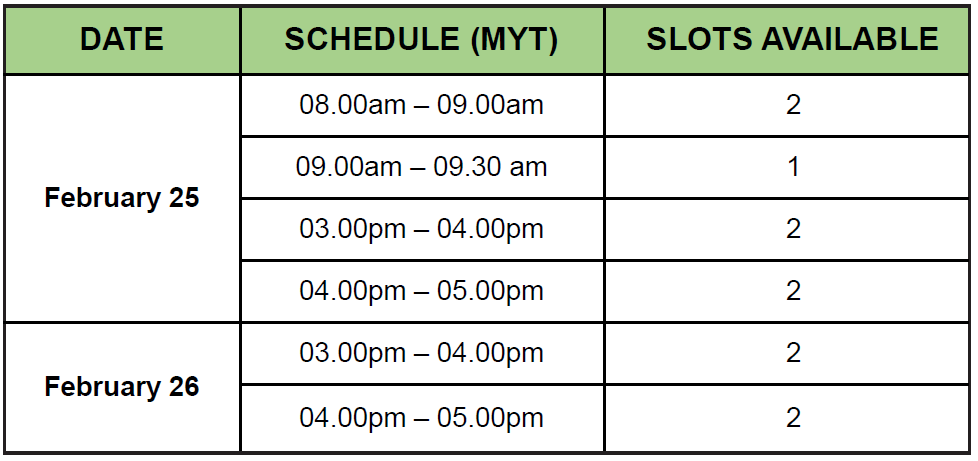
Rehearsal slots
You may book a rehearsal slot for your industry symposia. The fee is $1,000 USD. To book, please complete the form WCN22-Hybrid-Booking-form.pdf (theisn.org) and fill “Rehearsal slot” in the “Other” column.
Hostesses
A maximum number of two (2) guiding hostesses are allowed in the congress center to direct people to a specific symposium room by holding signs. They must remain in the main foyer/ground floor public areas/your own booth and must not disturb any scientific sessions. It is only allowed on the day of your symposium from the morning.
Hostesses can be hired independently or through our partner. To reserve, please complete the booking form in Forms. All hostesses must wear a valid industry access badge. Please refer to Registrations section for more details.
If you have selected the live stream option:
You are invited to provide us with some visual materials that will accompany your symposium video on the WCN congress virtual platform, including:
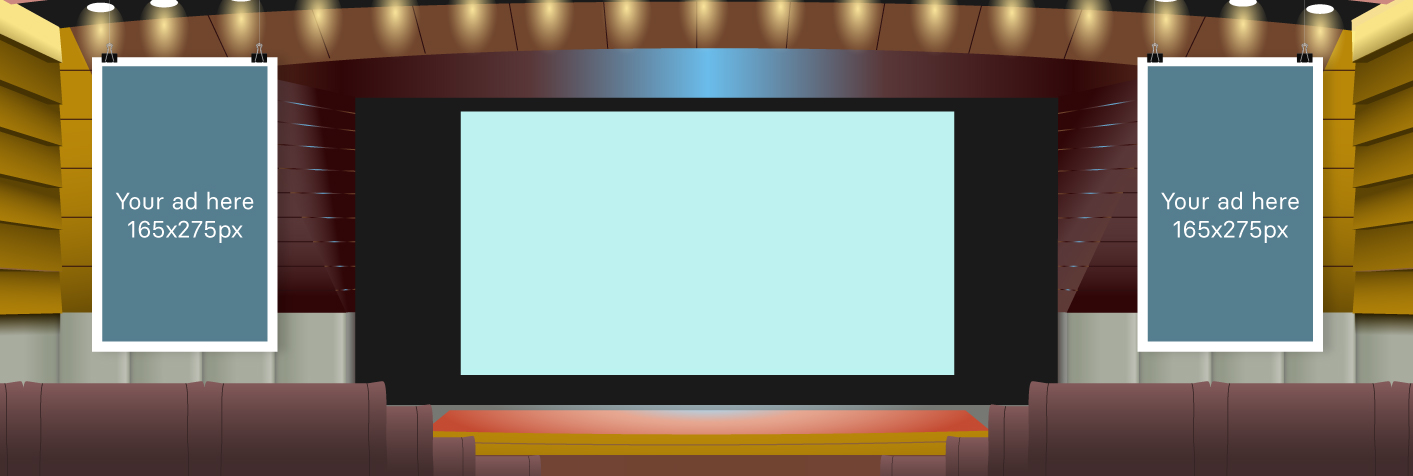
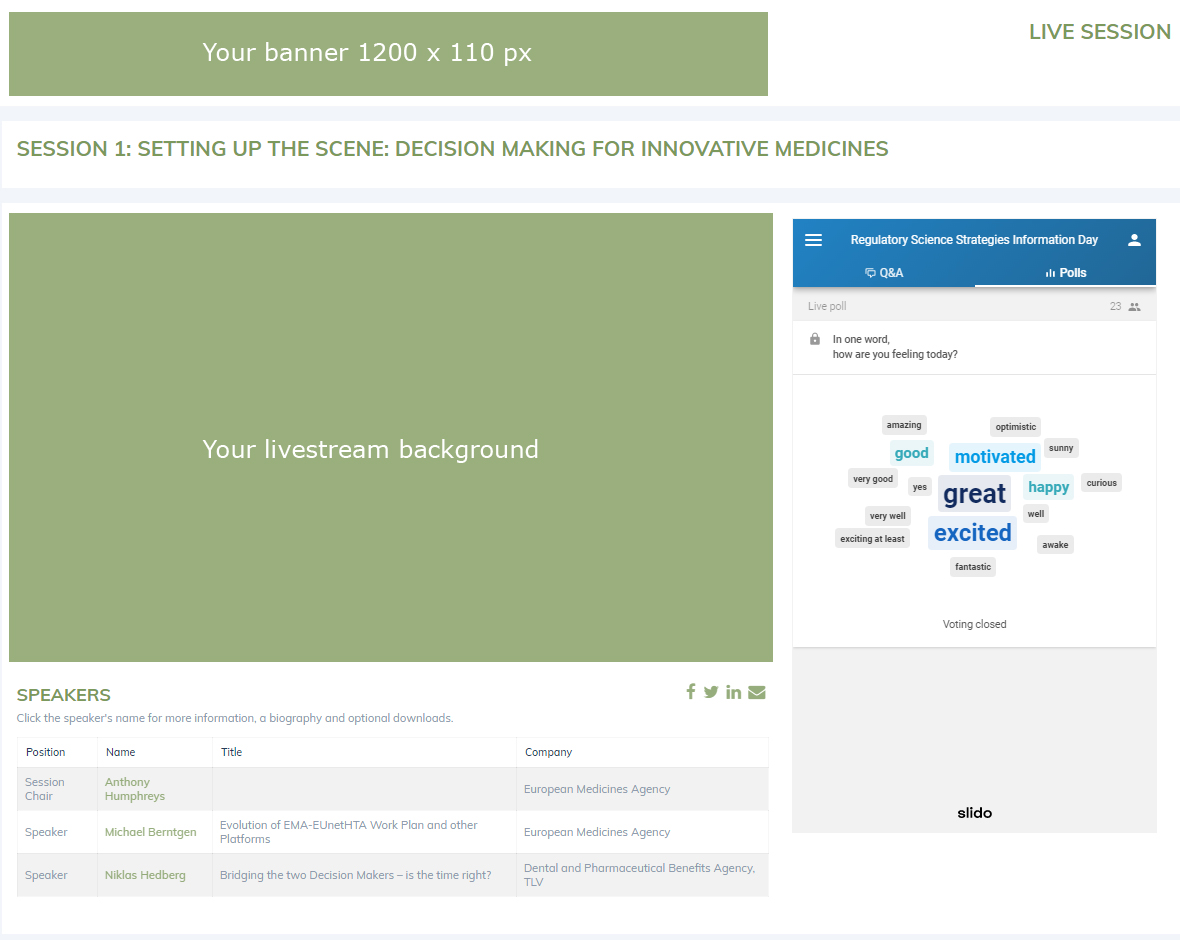
TO UPLOAD: Before February 9, 2022, please upload these items in the Industry Portal by selecting the button Session Set-up.
If you have selected the on-demand option:
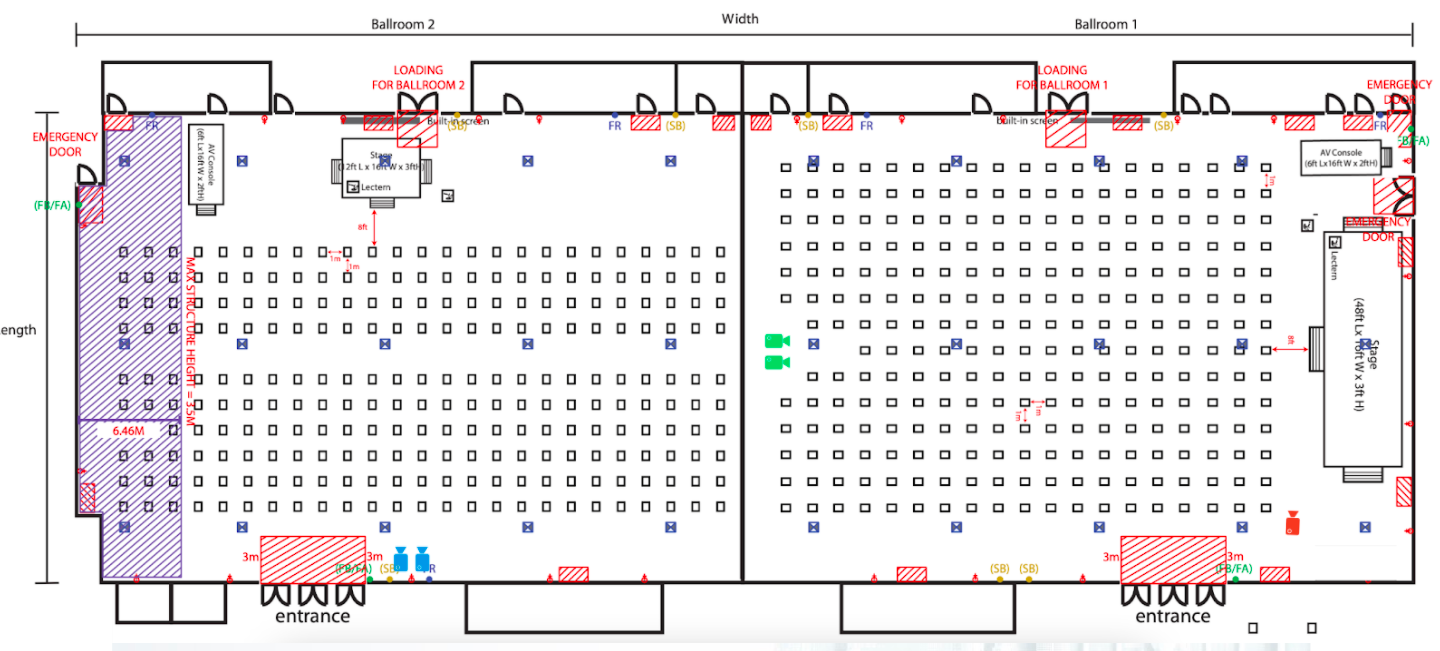
The entire symposium will be recorded with the cameras in the ballroom. The recorded video will be made available on the virtual platform within 10-30 minutes after the session ends.
You are invited to provide us with a banner that will accompany your symposium video on the WCN congress virtual platform.
TO UPLOAD: Before February 9, 2022, please upload these items in the Industry Portal by selecting the button Session Set-up.
Camera set-up
Speaker preparation room
The Speaker Preparation Room is located at Room 301, Level 3, East Wing in Kuala Lumpur Convention Centre. Symposium staff and speakers are welcome to use the room to:
1. Collect the speaker badge(s) at the following timings:
24 February 2022: 12.00pm – 6.00pm (MYT)
25 February 2022: 08.00pm – 3.00pm (MYT)
26 February 2022: 08.00pm – 3.00pm (MYT)
Companies will be requested to show identification and be asked to sign a receipt upon collection of badges.
2. Preview the presentation(s) at least two (2) hours before the beginning of the session, throughout the congress.
Presentation (PPT) Management System
An integrated presentation management system will be made available for the companies to upload the files. Please submit your final copy of the presentation to the system one (1) day before the symposium session.
When using the presentation management system, the following media are recommended to facilitate the presentation download at the Speaker Preparation Room:
● USB memory sticks (preferred medium),
● Hard Drive.
It is also possible to download the presentation from a personal laptop at the Speaker Preparation Room, provided that the speaker stops at the Speaker Preparation Room at least two (2) hours before the beginning of the session.
Managing presentation(s) from personal laptops directly in the session rooms are disallowed unless after appropriate consultation with ISN’s AV manager.
Single projection is made available in the symposium rooms respectively. The organizer does not foresee double projection (If the symposium organizers wish to add equipment, this needs to be coordinated through the WCN AV manager). The following guidelines have been put together to help produce the PowerPoint presentations and are applicable to the presentation management system.
Slide Transitions
Please do not use timer-controlled transitions. Timer controlled transitions are transitions that will switch to the next slide after certain seconds or minutes directly set up in the PowerPoint presentation. This will interfere with our system and cause confusion during the talks.
Pictures
Do NOT save the picture as BMP or TIFF (Size is too big). Images with .png and .jpg extensions are recommended to obtain a light presentation (Other kinds of extensions – recognizable by PowerPoint – will be accepted all the same). Save the pictures used in your presentation separately on your CD, DVD or USB-stick (In case of problems we can re-insert the original).
Video
Videos should not exceed 50 MB each (50MB is not necessarily the limit but the video may not show up smoothly, therefore not recommended). Always bring your videos additionally to your PowerPoint on DVD or other support, and inform the technicians at the speaker preparation room the day before the presentation.
MP4 Hi-Res preferred video formats. MPG (MPEG), WMV, AVI and MOV (Apple QuickTime formats) are also compatible. Save the videos used in your presentation on your USB stick, CD or DVD (In case of problems we may re-insert the original).
HTML
If you use hyperlinks to websites in your presentations, please download the website to your USB stick, CD or DVD. Try to avoid many different folders on the medium.
Graphics
Save the graphics or spreadsheets (Excel) used in your presentation on your USB-stick CD or DVD (In case of problems we may re-insert the original graphics or spreadsheets).
Fonts
Try to avoid use of non-standard Windows fonts in your presentations. If you are using specific, non-Standard Windows fonts (or if you are using Apple fonts not known on Standard Windows) then: include the fonts you have used on your USB stick CD or DVD.
Apple
Please give your filename an extension “.PPT” or “.PPTX”. Check your presentation on a Windows (preferably Win10 with PowerPoint 2016) machine before bringing it to the Congress. This will avoid a lot of stress on site: you will not have to fix things that are not working after the conversion from Apple to Windows at the Congress. Always try the videos in your presentation on another PC before bringing it to the Congress. And as always make an extra copy of your USB or CD/DVD.
NOTE
Example: create the folder “PRESENTATION” and copy the necessary files of the presentation (e.g pictures, graphics, videos, etc.) into the folder; then create the PowerPoint presentation “PRESENTATION” folder. Finally, save everything.
Language
Presentations as well as all audio-visual material should be in English (slides, DVDs).
General instructions for PPT presentations when using the WCN systems.
All presentations are held in Microsoft PowerPoint on a PC running with Windows. If you are using other software than Microsoft PowerPoint on a PC running Windows (example :OpenOffice, PowerPoint for Mac, Keynote) please make sure your presentation is converted to Microsoft PowerPoint for Windows PCs before you travel to the congress (preferably by trying the converted presentation on a Windows PC).
Presentations in Acrobat PDF format or Word format are not accepted.
Neither slide (35mm) projections nor personal laptops (MAC and PC) will be used in the Congress rooms. A presentation management system will manage all projections and will send the presentations to the assigned Congress rooms automatically.
This method guarantees an easier management, a higher quality of projection and a quicker and smoother running of the presentations. The use of personal laptops (MAC and PC) for presentations will therefore not be possible. In the Slide Center, a technician helps the speaker to transfer his or her presentation into the WCN-ppt-management system. When the transfer is complete, the technician performs a quick run of the presentation together with the speaker to check whether the presentation runs correctly, and all parts of the presentation are copied. Desktop computers will be available at the Slide Center for last minute changes and reviewing your presentation.
No more changes can be made in the Session Rooms where the session takes place. In each presentation room, a technical assistant starts each presentation at the right time using the computer connected to the WCN-ppt- management system. When the presentation is launched, the speaker has control and can navigate in the presentation with a remote device.
Technical instructions/ tips and guidelines
During the congress, presentations will run on PowerPoint 2016 with a projector resolution of 1920 x 1080 pixels in 16:9 format.
– Your presentation should be prepared in PowerPoint 2007, 2010, 2013, 2016.
– Preferred page setup is landscape orientation with high-contrast lettering and readable fonts (minimum font size = 24)
– Use high-contrast colors: light text on dark background or vice versa.
– A maximum of 7 lines / slides and 5 words / lines are recommended to improve the communication value of your slides.
Suggestions to improve a PowerPoint presentation:
– In general: the lighter your PowerPoint presentation (in size) the easier to handle it.
– Any video/image file must be in the same folder of the PowerPoint presentation and must be copied in the folder before being included in the presentation.
Industry partners can organize their registrations on the Industry Portal. Please read this section carefully to learn how to add badge names and extra registrations.
Log-ins will be sent to the main contact. You will need to set your password on the first time you log in. Please contact Alexandra Kelley at [email protected] if you have not received your log-in.
Full-congress registrations
Companies may receive a number of complimentary full-congress registrations depending on your booking:
Platinum supporter: 3 full congress included
Gold supporter: 2 full congress included
Showcase (3-star): 2 full congress included
Showcase (2-star): 1 full congress included
Full-congress registrations allow access to all areas of WCN’22. These registrations will be ready in your industry portal for you to allocate names to before February 11, 2022. Any name changes received after the deadline are subject to a fee. These registrations are intended for use only by the company.
Industry access badges
Industry symposia organizers have 5 x industry access badges automatically added to their registration group. Industry access badges have access to all industry symposia and the industry showcase. You will need to assign names in the Industry Portal. See instructions below.
How to order extra registrations
- Go to portal and click on button: Add registrations to my group
- The form will ask you to confirm your details and then click Next (bottom right)
- Select the type of badge you need and confirm the amount needed. Click Next.
- If you have selected a registration with a fee, complete the Payment
How to provide names for registrations
Go to portal and click on button: Complete badge names for my group
The main contact should provide the following information for each delegate in your group: title, name, surname, country, and email address.
Please check that participant’s names are entered correctly (example format: John Smith). Names should not be entered in CAPITAL letters.
Deadline: February 11, 2022
How to collect your badges on-site
You may collect all badges on February 24, 2022, from 12pm noon to 6pm at the exhibitor counter.
Companies will be asked to provide the Global Operations Center with the name, e-mail address and telephone number of the person who will pick up all the badges onsite, to [email protected] before 10 February 2022. This person will be asked to sign a receipt upon collection of badges.
The sponsoring company needs to ensure that all publications referring to their symposium mention: “Official WCN’22 sponsored symposium” to avoid any confusion with the official WCN scientific program.
What is included in the promo pack?
- Congress banners
- Congress presentation slide
- VWCN logo in various formats
- Social media image templates
- Suggested text for your social media posts
- Official VWCN hashtags