
Welcome to your Showcase Manual
Please find below the information you will need to plan your showcase at the World Congress of Nephrology.
What is the industry portal?
The industry portal is an important tool in your WCN’22 planning. You can do the following:
- Upload your showcase content
- View your registrations, buy extra and provide names
- View invoices and confirmations
- Upload industry symposia programs
- Upload all industry symposia material online
How do I access the industry portal?
Access the industry portal here
Log-ins will be sent to you in October 2021. You will need to set your password on the first time you log in.
I have not received my log-in
Please contact Alexandra Kelley at akelley@theisn.org to receive your log-in.
A series of webinars will be organized for our industry partners to ask their questions live to the team.
The webinars will take audiences through various elements of exhibition and industry symposia set-up. The topics and dates for each webinar will be shared soon.
Webinars have been arranged at varying times to accommodate for different time zones. All webinars will be recorded and posted here shortly after.
Webinar #1
Exhibition
December 2, 2021 at 15:00 CET
Webinar #2
Exhibition
January 11, 2022 at 15:00 CET
Webinar #3
Industry Symposia
November 30, 2021 at 14:00 CET
Important dates
October 2021
November 23, 2021
December 1, 2021
December 14, 2021
January 11, 2022
January 13, 2022
January 21, 2022
January 24, 2022
February 10, 2022
February 10, 2022
February 10, 2022
February 10, 2022
February 11, 2022
February 15, 2022
February 21, 2022
February 25, 2022
February 27, 2022
May 31, 2022
Industry showcase manual released
Q&A webinar for exhibitors #1
Deadline to book industry showcase
Content deadline: Dec Edition Ad in Congress E-Newsletter & Article in E-Newsletter
Q&A webinar for exhibitors #2
Content deadline: Jan Edition Ad in Congress E-Newsletter & Article in E-Newsletter
Submit topic and logo for Topical Networking Room
Submit visual for Ad on Congress Platform
Content deadline: Ad in Congress E-Newsletter & Article in Congress E-Newsletter
Submit requested timeslot and content for Push Notification
Submit requested timeslot, platform and content for the Social Media Post
Submit content for Delegate Bag Insert
Content deadline: Feb Edition Ad in Congress E-Newsletter & Article in E-Newsletter
Deadline to provide names of complimentary registrations
Exhibitors to complete final checks of industry showcase
Industry showcase opens 8am CET / 3pm MYT
Industry showcase closes
WCN remains open
Where do I go to upload my content?
To edit your showcase, access your industry portal and click on the Industry Showcase button. This will be available in October 2021.
Is there a deadline to build our booth?
Final checks will take place on February 21, 2022. Please note you will still be able to make changes to your showcase at any time the platform is live from 24 February – 31 March 2022.
How does the booth look?
You may use the virtual booth in the platform, or your own microsite. See microsite instructions at the bottom in pink box.
You will provide the background design and your allotted content (videos and PDFs). Please design the background using the template we provide and upload this to the booth building form. On the same form, you will upload the PDF and videos which will placed automatically within your design. The form will also ask for additional information to display on the booth page including: company logo, company description, company website.
Background design
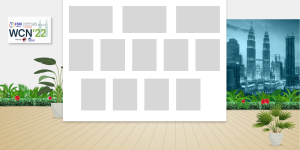
Download the template PSD (photoshop) file. You may leave as WCN branding as default – or change the design to your own company branding.
Grey boxes = Do NOT move the positioning of these in the design. Please fill with PDF / video screenshot or similar.
Save your photoshop file as PNG and upload during the booth form.
Video x 3
We recommend that the maximum size of your videos is 4GB. Use an MP4 movie format. You may upload 3 videos. This can be 3 different videos or you may upload the same video multiple times to display more than once.
Please note that transcoding takes time and your video may not be immediately visible in the preview. If so, it will become available when reloading the configuration later.
PDF x 9
You will need the design in two formats:
- PNG or JPEG format. The specifications are 750w x 1000h.
- PDF format. We recommend that the size of your PDF is between 2GB – 4GB. Any dimension is accepted.
Please note – when naming the PDFs in the form, you must use different names for each one otherwise they will not show.
Additional information to submit:
Company logo
Two versions of your company logo are required:
- 960 x 540 pixels (Main logo)
- 160 x 90 pixels (Used a thumbnail where needed)
It is important that your images stick to these proportions. To have bigger sizes is not a problem but the width and height ratio must be respected (190×90 -> 380x 80 etc.)
Company website URL
There are no max characters. It is advised to use a URL shortener.
Company description
Max 1000 characters allowed for your company description. Links and formatting can be included. However unnecessary html encoding is removed after final edit.
Networking information to submit:
Display for booth contacts (x6)
The form will ask for details of your main contacts to display on your booth.
- First and last name
- Image
- Title
- Email address
- Phone number
- Location
- Experience
You can decide to allow delegate to schedule meetings with your contacts.
Leave a message button
There is a button on your showcase for delegates to leave a message. The messages are sent to this contact you provide in the form. The fields are:
- First name
- Surname
- Email address
Live chat
You can activate the live chat function on your showcase. This allows delegates and exhibitors to chat on the booth directly.
You may choose between the following:
- Not activated
- Tawk
- Livechat
- Clickdesk
- Helpcrunch
You should make an account to use. We recommend using Tawk as there is a free subscription available. Tawk has features to set your available times and customize the pop-up icon also.
Possibility to add disclaimers
During booth set-up, there is a field to turn on a disclaimer message that will pop-up as delegates enter the virtual booth. You can customize this message.
Previewing my showcase
You will be able to preview how your showcase looks at the end of the upload process. You can preview any changes you make immediately. If you do not see your changes, please refresh the page.
Option 2: Link to your external company microsite
To set this up:
- Access your industry portal
- Click on Industry Showcase button to load the booth building form
- In the form, you will only need to upload your logo(s) and insert the microsite URL of your micro-site into the Company Description field
- Our technicians will automatically create the link
Delegates will click on your company logo shown in the industry showcase and be taken directly to your microsite. If delegates click on the logo, we will be able to collect and share metrics with the exhibitor.
If a delegate accesses your booth through another channel, we will not be able to collect the metrics. Please take this into consideration when promoting your booth before the meeting. You must use the URL we provide and not the direct URL to your microsite.
Where do I go to upload my content?
To edit your showcase, access your industry portal and click on the Industry Showcase button. This will be available in October 2021.
Is there a deadline to build our booth?
Final checks will take place on February 21, 2022. Please note you will still be able to make changes to your showcase at any time the platform is live from 24 February – 31 March 2022.
How to build your booth
You will provide the background design and your allotted content (videos and PDFs). Please design the background using the template we provide and upload this to the booth building form. On the same form, you will upload the PDF and videos which will placed automatically within your design. The form will also ask for additional information to display on the booth page including: company logo, company description, company website.
Background design
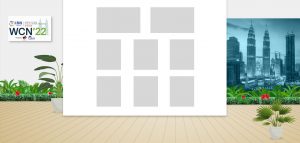
Download the template PSD (photoshop) file. You may leave as WCN branding as default – or change the design to your own company branding.
Grey boxes = Do NOT move the positioning of these in the design. Please fill with PDF / video screenshot or similar.
Save your photoshop file as PNG and upload during the booth form.
Video x 2
We recommend that the maximum size of your videos is 4GB. Use an MP4 movie format. You may upload 2 videos. This can be 2 different videos or you may upload the same video multiple times to display more than once.
Please note that transcoding takes time and your video may not be immediately visible in the preview. If so, it will become available when reloading the configuration later.
PDF x 6
You will need the design in two formats:
- PNG or JPEG format. The specifications are 750w x 1000h.
- PDF format. We recommend that the size of your PDF is between 2GB – 4GB. Any dimension is accepted.
Please note – when naming the PDFs in the form, you must use different names for each one otherwise they will not show.
Additional information to submit:
Company logo
Two versions of your company logo are required:
- 960 x 540 pixels (Main logo)
- 160 x 90 pixels (Used a thumbnail where needed)
It is important that your images stick to these proportions. To have bigger sizes is not a problem but the width and height ratio must be respected (190×90 -> 380x 80 etc.)
Company website URL
There are no max characters. It is advised to use a URL shortener.
Company description
Max 1000 characters allowed for your company description. Links and formatting can be included. However unnecessary html encoding is removed after final edit.
Networking information to submit:
Display for booth contacts (x3)
The form will ask for details of your main contacts to display on your booth.
- First and last name
- Image
- Title
- Email address
- Phone number
- Location
- Experience
You can decide to allow delegate to schedule meetings with your contacts.
Leave a message button
There is a button on your showcase for delegates to leave a message. The messages are sent to this contact you provide in the form. The fields are:
- First name
- Surname
- Email address
Possibility to add disclaimers
During booth set-up, there is a field to turn on a disclaimer message that will pop-up as delegates enter the virtual booth. You can customize this message.
Previewing my showcase
You will be able to preview how your showcase looks at the end of the upload process. You can preview any changes you make immediately. If you do not see your changes, please refresh the page.
Where do I go to upload my content?
To edit your showcase, access your industry portal and click on the Industry Showcase button. This will be available in October 2021.
Is there a deadline to build our booth?
Final checks will take place on February 21, 2022. Please note you will still be able to make changes to your showcase at any time the platform is live from 24 February – 31 March 2022.
Building your booth on WCN platform
Company logo
Two versions of your company logo are required:
960 x 540 pixels (Main logo)
160 x 90 pixels (Used a thumbnail where needed)
It is important that your images stick to these proportions. To have bigger sizes is not a problem but the width and height ratio must be respected (190×90 -> 380x 80 etc.)
Company website URL
There are no max characters. It is advised to use a URL shortener.
Company description
Max 1000 characters allowed for your company description. Links and formatting can be included. However unnecessary html encoding is removed after final edit.
PDF x 3
You will need the design in two formats:
- PNG or JPEG format. The specifications are 750w x 1000h.
- PDF format. We recommend that the size of your PDF is between 2GB – 4GB. Any dimension is accepted.
Please note – when naming the PDFs in the form, you must use different names for each one otherwise they will not show.
Banner
The banner displays at the top of your showcase. The specifications are 1500w x 580h.
Possibility to add disclaimers
During booth set-up, there is a field to turn on a disclaimer message that will pop-up as delegates enter the virtual booth. You can customize this message.
Previewing my showcase
You will be able to preview how your showcase looks at the end of the upload process. You can preview any changes you make immediately. If you do not see your changes, please refresh the page.
Full-congress registrations
Companies may receive a number of complimentary full-congress registrations depending on your booking:
Platinum supporter: 3 full congress included
Gold supporter: 2 full congress included
Showcase (3-star): 2 full congress included
Showcase (2-star): 1 full congress included
Full-congress registrations allow access to all areas of WCN’22. These registrations will be ready in your industry portal for you to allocate names to before February 11, 2022. Any name changes received after the deadline are subject to a fee. These registrations are intended for use only by the company.
Industry access badges
You can request an unlimited number of complimentary industry access badges for your staff to use for organizing purposes. Industry access badges have access to all industry symposia and the industry showcase.
Open access for symposia sessions
Industry symposia are open-access. This allows someone who may not be registered to WCN’22 to follow your symposia. They will register and be able to access the WCN platform but only be able to view the symposia.
They still must register (to be able to share the metrics) but the registration is free. You will not need to enter any promo/discount code to receive the free registration. It is automatic.
How to order extra registrations
- Go to portal and click on button: Add registrations to my group
- The form will ask you to confirm your details and then click Next (bottom right)
- Select the type of badge you need and confirm the amount needed. Click Next.
- If you have selected a registration with a fee, complete the Payment
How to provide names for registrations
Go to portal and click on button: Complete badge names for my group
The main contact should provide the following information for each delegate in your group: title, name, surname, country, and email address.
Please check that participant’s names are entered correctly (example format: John Smith). Names should not be entered in CAPITAL letters.
Deadline: February 11, 2022.
How can we reach out to delegates?
1. Use the Networking page
Industry may interact with delegates via the Networking page. You can find the full list of delegates listed on this page. You can talk via chat, group chat or video. You will see first name and surname and photo (if provided). Hover over their name to see more registration information. WCN organizers are encouraging delegates to complete their profile and add extra information.
2. Live chat on your booth
Exhibitors (★★★ only) have the opportunity for live chat function on their showcase. You can activate the live chat function on your showcase. This allows delegates and exhibitors to chat on the booth directly. The chat will pop-up on the bottom corner of the screen. You do not need to be logged in to WCN to use the live chat function as it is an external technology.
3. Attend OR host scheduled topical networking events
Throughout the congress, special topical networking events will be scheduled in-between sessions. Delegates are invited to join us on our special networking platform powered by SpatialChat. This platform allows you to easily join networking rooms that resemble the in-person experience. Industry can attend topical networking events and even host a sponsored event with their own chosen topic. Please reach out for more information.
The schedule will be made available on the WCN website in 2022.
4. Interact with the Social Media Wall
The virtual Social Media Wall will display all social media posts that include the World Congress of Nephrology’s official hashtag.
The wall collects and displays content from multiple social media platforms. By using the congress hashtag #ISNWCN in your social media posts, these will be displayed on the delegate social media wall – so you can catch all the latest conversation on the congress. We encourage our industry partners to use #ISNWCN. Please see Promotion tab more more guidance.
Official hashtag: #ISNWCN
Considerations
Whilst interacting with other delegates, we thank you for adhering to the code of conduct (which will be available here shortly).
The information delegates have uploaded to their WCN profile for Networking is only for use within WCN environment. It is not allowed to save any personal data taken from profiles during the congress without prior permission of that individual, for the purpose of contacting them outside of WCN.
How can delegates access the booth?
Delegates will enter WCN’22 and click on the button Showcase. This will take them to the showcase lobby area where they can enter your company showcase.
How long will my showcase be available to view by WCN attendees?
Industry showcase main dates are from February 25 – 27, 2022. The WCN event (including showcase) remains open until May 31, 2022.
What are the exhibition hours?
As an international congress with delegates attending both first broadcasts and on-demand content 24/7 throughout the event, we do not set any exhibition hours in which we ask you to be present on your booth. We recommend being available during break times.
Editing access to your showcase by health care professional status
Each exhibitor will decide if their showcase is accessible by non / health care professionals during the booth building form.
When delegates access WCN for the first time, they will be asked if they are a prescribing health care professional.
Editing access to showcase content per country of delegate
You can choose to restrict who can view the PDFs uploaded to your booth by country of delegate.
When you upload your PDF on the form, there is an option to choose countries that should not be able to view certain content.
Once activated, the delegate from the restricted-country will still be allowed access to your showcase (and view your company description, logo etc.). However, the restricted content (PDF) product picture will be blurred and no click-action will be available to open the PDF.
Can I view the showcase on different devices?
All layouts will adapt to the screen size of the device. Please note that booth visuals are not supported on iOS devices and will not show.
Can I log into WCN on different devices?
Yes, you can log in on multiple devices.
What data will we receive about WCN’22?
All exhibitors will receive a WCN’22 statistics report after the congress with information such as: total number of delegates, % breakdown of interests and practice settings, country and region data, and abstract statistics. This information is general and will not identify any delegate individually.
What data will we receive about our showcase?
Exhibitors will receive an export of their booth metrics. It will show the unique amount of visits and the total amount of visits to your booth. If the participant has agreed to share their data, the report will contain their registration information including: date of visit, first name, surname, gender, email, affiliation and country. It may also contain: area of activity, professional interest, practice setting (to be confirmed). This data will identify delegate(s) individually and is only shared upon their consent. When delegates log-in to WCN for the first time, they will be prompted to update their profile and set the following preferences:
- Please do (not) share my details with organizers of symposia sessions I attend
- Please do (not) share my details with booths I visit in the Industry Showcase
If the delegate does not give consent to share their registration details, the line in the report will not include any of the abovementioned data.
Will we receive data about other exhibitors?
Exhibitors will only receive information pertaining to their own booth. They will not receive a comparison report to other exhibitors.
When will we receive metrics?
★ ★ & ★ ★ ★: Exhibitors will have access to a live report with raw data. At the end of WCN, exhibitors will receive a cleaned-up version with data graphs.
★: Exhibitors will receive a cleaned-up export with data graphs at the end of WCN.
What is included in the promo pack?
- Congress banners
- Congress presentation slide
- VWCN logo in various formats
- Social media image templates
- Suggested text for your social media posts
- Official VWCN hashtags
Can we receive the URL of our booth to plan promotion?
Yes – before the congress you will receive the direct URL for your booth access that you can use in your own promotion ONLY as from when the exhibition officially opens on February 24, 2022.
Please note if you are using the microsite option, you must include the booth URL in any promotional material rather than the microsite URL. This is to keep accessibility for registered delegates and the organizer to be able to provide metrics.
You will find here information for the different advertising opportunities at WCN’22. Please contact Charleigh Claire at cclaire@theisn.org for more details or to complete a booking form.
Ad in Congress Newsletter
Fee: $4,000
Specifications: 190 x 600px No specific product advertising allowed. GIF/animated images are not recommended as can affect quality. 72 DPI is optimal for all web artwork.
|
Edition
December 2021 (Pre congress) |
Deadline to submit artwork
December 14, 2021 |
January 2022 (Pre congress) |
January 13, 2022 |
February 2022 (Pre congress) |
February 13, 2022 |
February 24, 2022 (Congress day) |
February 10, 2022 |
February 25, 2022 (Congress day) |
February 10, 2022 |
February 26, 2022 (Congress day) |
February 10, 2022 |
February 27, 2022 (Congress day) |
February 10, 2022 |
Submit via email to akelley@theisn.org
Please note the template is subject to change slightly depending on content. There are two ad spaces available per newsletter of equal size.
Article in Congress Newsletter
Submit an feature article on your symposium or information about breaking research, advances in healthcare, patient care and more, in editions of the WCN E-Newsletter.
Fee: $4,000
Specifications: Title + article of maximum 900 words
|
Edition
December 2021 (Pre congress) |
Deadline to submit artwork
December 14, 2021 |
January 2022 (Pre congress) |
January 13, 2022 |
February 2022 (Pre congress) |
February 13, 2022 |
February 24, 2022 (Congress day) |
February 10, 2022 |
February 25, 2022 (Congress day) |
February 10, 2022 |
February 26, 2022 (Congress day) |
February 10, 2022 |
February 27, 2022 (Congress day) |
February 10, 2022 |
Submit via email to akelley@theisn.org
Please note the template is subject to change slightly depending on content. There are two ad spaces available per newsletter of equal size.
Email Promotion
Send a dedicated email to all registered delegates via the ISN on behalf of the symposium organizer. Limited slots available on a first-come, first-served basis (for symposium organizers only).
Fee: $6,000 USD
Specifications:
- 250 max words for main body text
- 190 x 600 px banner visual
Deadline: You must request your chosen publication date and submit content min. 2 weeks prior publication date. Please note these are first come, first serve spots and will be checked against the editorial calendar for availability.
Event Platform
Fee: $7,500 + $1,000 (with content)
Specifications: 165 x 275 px No specific product advertising allowed. GIF/animated images are not recommended as can affect quality. 72 DPI is optimal for all web artwork.
Deadline to submit artwork and link (if applicable): January 24, 2022
Please note the example is subject to changes.
Home Page on WCN Website
Fee: $7,500
Specifications: 970 x 90px (Large leaderboard) No specific product advertising allowed. GIF/animated images are not recommended as can affect quality. 72 DPI is optimal for all web artwork.
Deadline to submit artwork: No deadline. Artwork will be uploaded as soon as provided by sponsor.
Registration Pages on WCN Website
Fee: $4,000
Specifications: 300 x 300px No specific product advertising allowed. GIF/animated images are not recommended as can affect quality. 72 DPI is optimal for all web artwork.
Deadline to submit artwork: No deadline. Artwork will be uploaded as soon as provided by sponsor.
Link: https://www.theisn.org/wcn/registration-practicalities/
Industry Pages on WCN Website
Fee: $4,000
Specifications: 300 x 300px No specific product advertising allowed. GIF/animated images are not recommended as can affect quality. 72 DPI is optimal for all web artwork.
Deadline to submit artwork: No deadline. Artwork will be uploaded as soon as provided by sponsor.
Link: https://www.theisn.org/wcn/industry/congress-supporters/
Push Notification
Fee: $5,000
Specifications: 400 max characters + emojis (from standard emoji keyboard) + URL. No specific product advertising allowed.
Deadline to submit:Please submit your preferred time/date and notification text by email to akelley@theisn.org by February 10, 2022. Schedule will be allocated by first come, first serve.
Please note there is a maximum of 5 notifications allowed per day.
Social Media Post
Promote your symposium on any one of the ISN’s popular and growing social media networks. The ISN will post your content on any one of our social media accounts below:
Facebook: 32k+ fans https://www.facebook.com/ISNkidneycare
Twitter: 11.7k+ followers https://twitter.com/ISNkidneycare
LinkedIn: 8.1k+ followers https://www.linkedin.com/company/isnkidneycare/
Instagram: 1,600+ followers https://www.instagram.com/isnkidneycare/
Fee: $5,000
Deadline to submit: By February 10, 2022 please submit the following details by email to akelley@theisn.org:
- Your preferred time/date (This will be approved by our ISN Social Media Manager against editorial calendars)
- Chosen social media
- Content of push notification (Text and URL)
Schedule will be allocated by first come, first serve. No specific product advertising allowed.
GIF/animated images are not recommended as can affect quality. 72 DPI is optimal for all web artwork.
Delegate Bag
Participants will be sent their delegate bags by email before WCN. They can also collect their virtual delegate bag during WCN on the platform. The bag will contain promotion of WCN program/activities plus adverts from industry participants with a button to download a PDF leaflet.
Fee: $1,000
Deadline to submit: February 10, 2022 to akelley@theisn.org
Specifications:
Image: 500px x 500px GIF/animated images are not recommended as can affect quality. 72 DPI is optimal for all web artwork.
Title: Max 25 characters
Subtitle: Max 40 characters
Intro text: Max 600 characters
Download link: PDF of any size
Topical Networking Room
Topical networking rooms will facilitate interaction for participants. Networking rooms may have open access for all or be restricted for certain groups (grant recipient room, speaker networking room, etc). Within each room, participants can use the chat functionality or engage in direct video calls.
Fee: $5,000
Deadline to submit: You may suggest a topic for your sponsored room. Please submit topic suggestion and logo by January 28, 2022 to akelley@theisn.org
Hospitality Suite for Platinum Supporters
Virtual hospitality suites are available on the WCN platform for platinum supporters. Hospitality suites are availability for the organization of internal and external meetings. Meetings are private and upon invitation only. The room is not open to all delegates by default. The room is password protected which can be set by the sponsor. The suites are powered by SpatialChat technology. Please let us know if you would like a demo. Kindly note that large meetings should not take place during main session hours. The maximum capacity of rooms is 50 people.
Deadline to submit: By January 17, 2022, please email cclaire@theisn.org to confirm you would like to organize a suite at WCN. At the same time, please provide:
- Choice of password (optional; customized)
- Days required (if different from standard; 25 – 27 Feb 2022)
- Background visual (optional; customized 3200 H x 1800 W pixels)
Alexandra Kelley
ISN Business Development Administrator
akelley@theisn.org
Paolo Zavalloni
ISN Events Project Manager
pzavalloni@theisn.org
Charleigh Claire
ISN Business Development Manager
cclaire@theisn.org